- Home
- Indoor LED Displays
- Indoor LED Video Wall Viewing Distance Guide
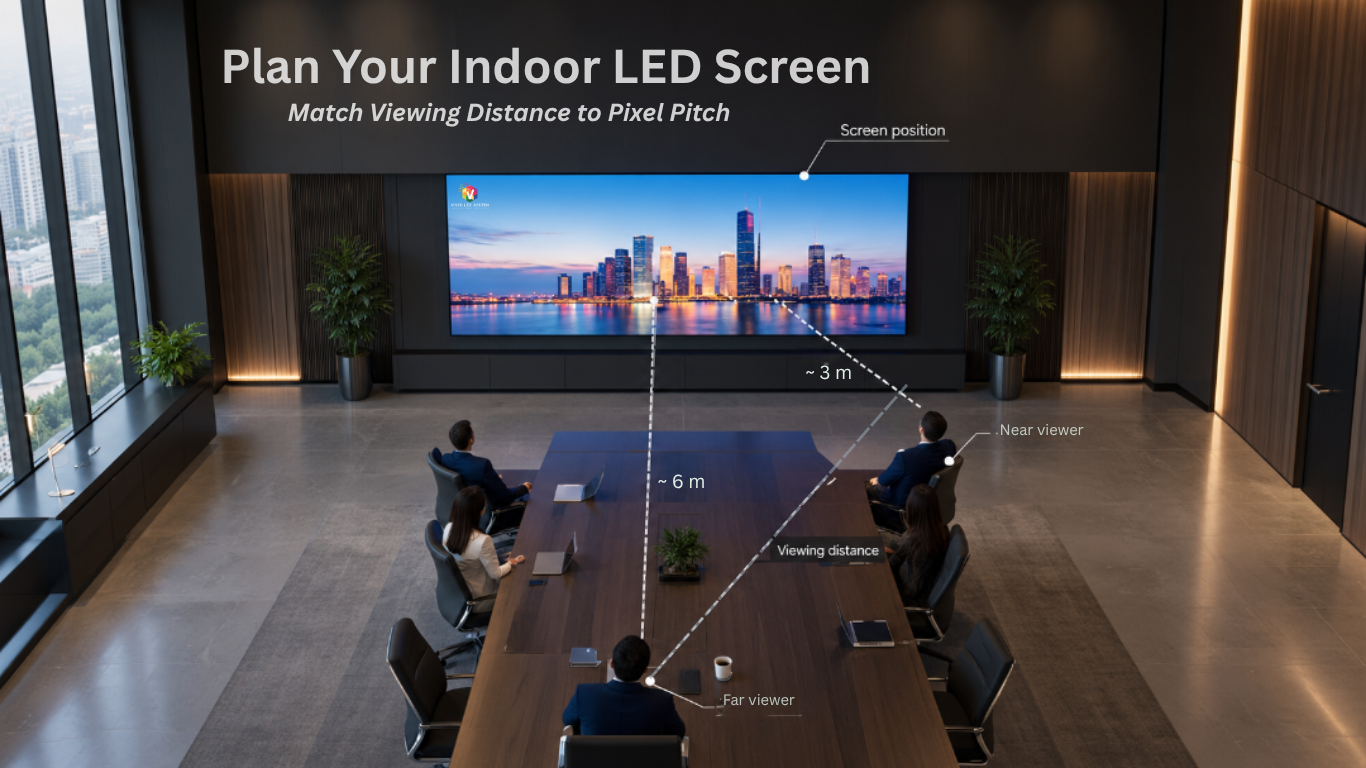
Table of Contents
“How far should people sit from the screen?” sounds like a simpler question than “what pixel pitch do I need?” It’s actually the bigger one.
Pixel pitch tells you how close someone can stand before the image looks grainy.
Viewing distance is the whole picture: how close, how far, how high on the wall, and at what angle, for every seat in the room, not just the front row.
Get the pixel pitch right and the room wrong, and you’ll still hear complaints from the far end of the boardroom table.
This guide covers the room-planning side: where to mount an indoor LED video wall, how far to seat people from it, and how to plan for every seat rather than the closest one.
If you haven’t read our pixel pitch guide, start there for the spec side and this picks up where that one leaves off.
We have walked corporate, boardroom and control room clients through this exact planning process across India. What follows is what we actually cover before a quote goes out and not a generic formula.
1. Viewing Distance Is Four Decisions, Not One !
Most guides collapse “viewing distance” into a single pixel-pitch formula. In practice, it’s four separate decisions that only work correctly together:
- Pixel pitch: sets how close your nearest viewer can sit before the image looks dotted.
- Screen size: what physical dimensions are required for the space?
- Mounting height and angle: sets whether anyone gets neck strain or a distorted off-angle view.
- Content type: a wall showing branded video tolerates a far looser distance than one showing a financial model.
Get all four right and the screen disappears into the room. Get only the first one right, which is what most pixel-pitch calculators optimise for and you can still end up with a wall that’s too small for the back of the room, or mounted too high for the front.
2. Two Factors That Actually Matter: Closest Viewer and Farthest Viewer
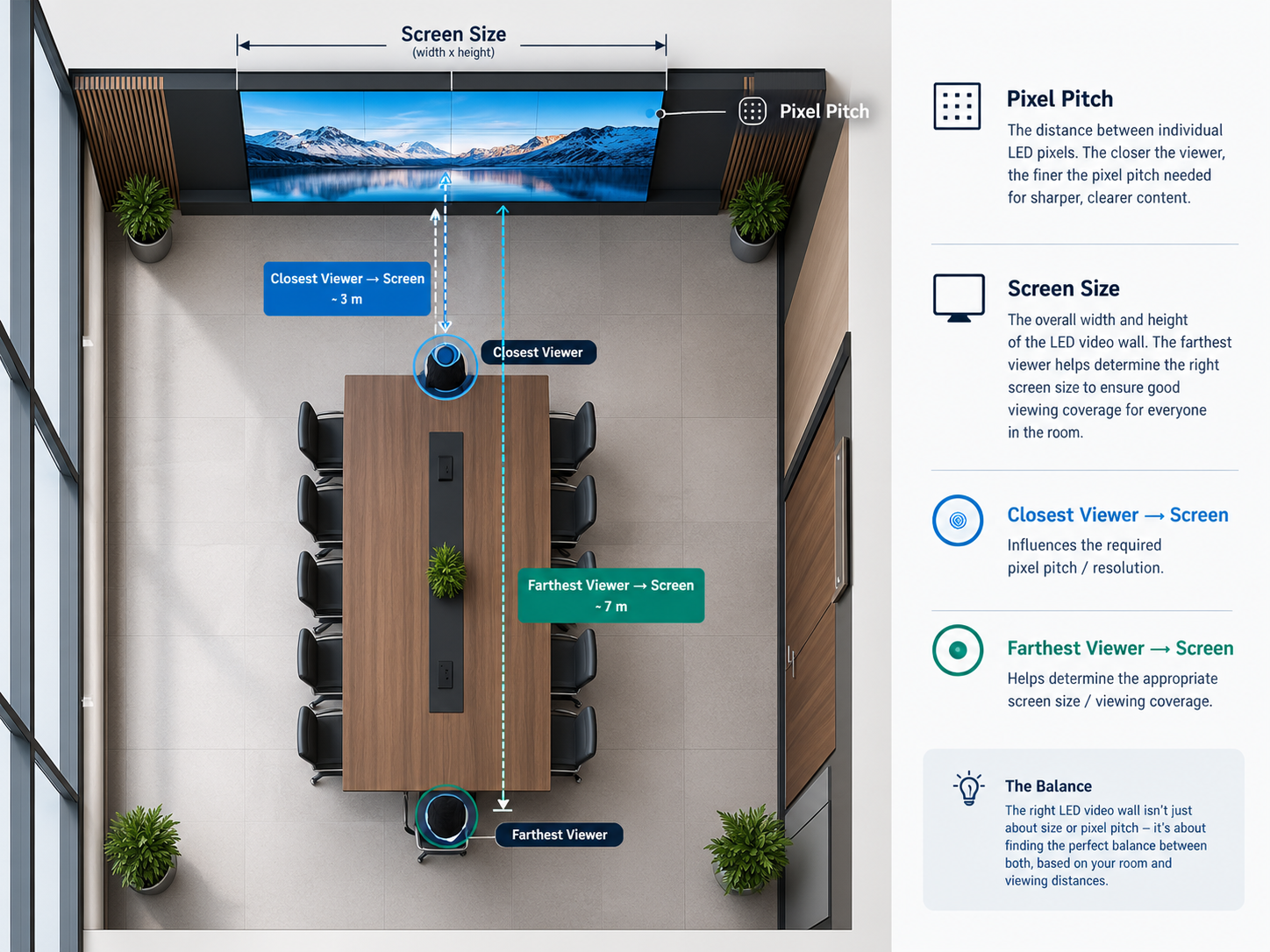
Every room has two distances worth measuring before you spec anything: where your closest viewer sits and where your farthest viewer sits.
a. Your Closest Viewer sets the minimum pixel pitch:
Seat them any nearer to a coarser screen and they'll see the individual LEDs. In a small boardroom, that's often the person directly across the table sometimes under 2 metres away.
b. Your Farthest Viewer sets the minimum screen size:
No pixel pitch fixes a display that's simply too small to read from the back of the room. In a larger boardroom or training room, that can be 6-9 metres away.
If you consider the spec only for:
- Closest viewer, then the wall might be sharp but will be too small for the far seats.
- Farthest viewer, then the nearest seats see pixelation on a screen, that's plenty big enough.
Miss either number, and one end of the room loses!
3. Does Your Content Need "Basic" or "Analytical" Viewing?
The audiovisual industry has a formal standard for exactly this question.
The standard splits content into two categories, and which one applies to your room changes the numbers substantially:
- Basic viewing - branding, video, dashboards glanced at rather than read, general presentations.
- Viewers can sit further back and still get full value.
- Analytical viewing - financial models, dense spreadsheets, technical drawings, anything where someone needs to read small text or fine detail. This tightens the acceptable viewing distance considerably compared to basic content on the same screen.
This is the single most common gap in boardroom briefs we see: the room gets planned around “we’ll show presentations”, and then it’s used for live spreadsheet reviews within the first month.
- If there's any chance the wall will display dense data, plan for analytical viewing from day one, because retrofitting a finer pitch afterwards costs far more than specifying it correctly the first time.
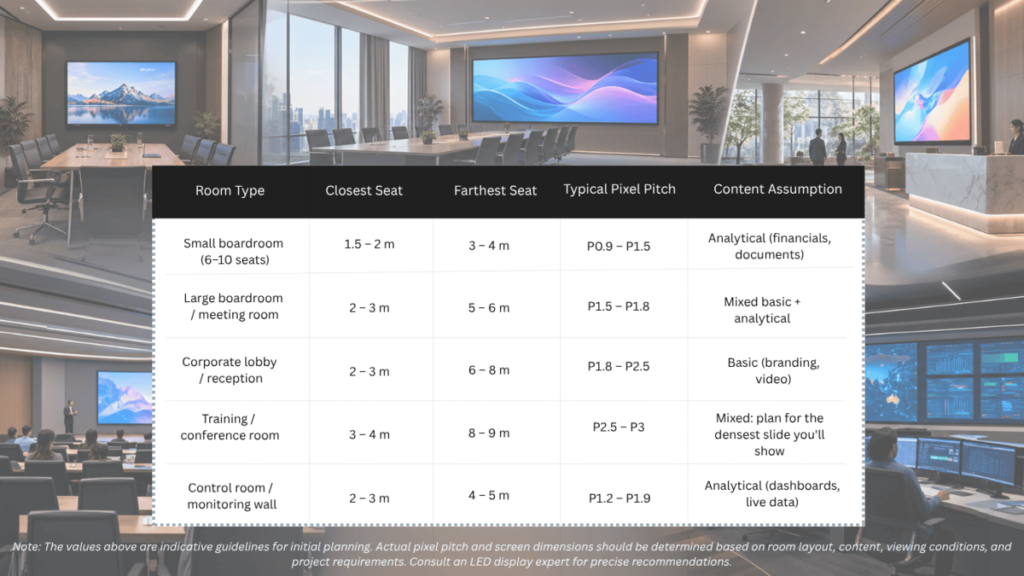
4. Recommended Viewing Distances for Indoor Rooms
For the complete pixel-pitch breakdown across every application, including outdoor, see our complete pixel-pitch guide.
5. Screen Placement: Mounting Height, Eye Level & Viewing Angle
Distance is only half the equation: height and angle decide whether the room actually looks at the screen comfortably.
A. Mounting height
For seated boardroom audiences, keep the centre of the screen close to seated eye level – a commonly used design default is around 1,200 mm from the floor.
Mount it meaningfully higher and you introduce neck strain over longer meetings; mount it lower and the back row loses sightlines over the people in front.
If the same room needs to serve both seated and standing use, a slight downward tilt (5-10°) on a higher mount is a reasonable compromise, though a fixed compromise is rarely as good as getting the height right for the room’s primary use.
B. Viewing angle
Every LED panel has a horizontal and vertical viewing angle beyond which brightness and colour start to fall off.
In narrow boardrooms this rarely matters; in wide rooms or long boardroom tables, check the angle spec and favour wider viewing angles, where horizontal is a reasonable indoor benchmark — so the seats at the far ends of the table aren’t looking at a dim, washed-out version of the screen everyone else sees clearly.
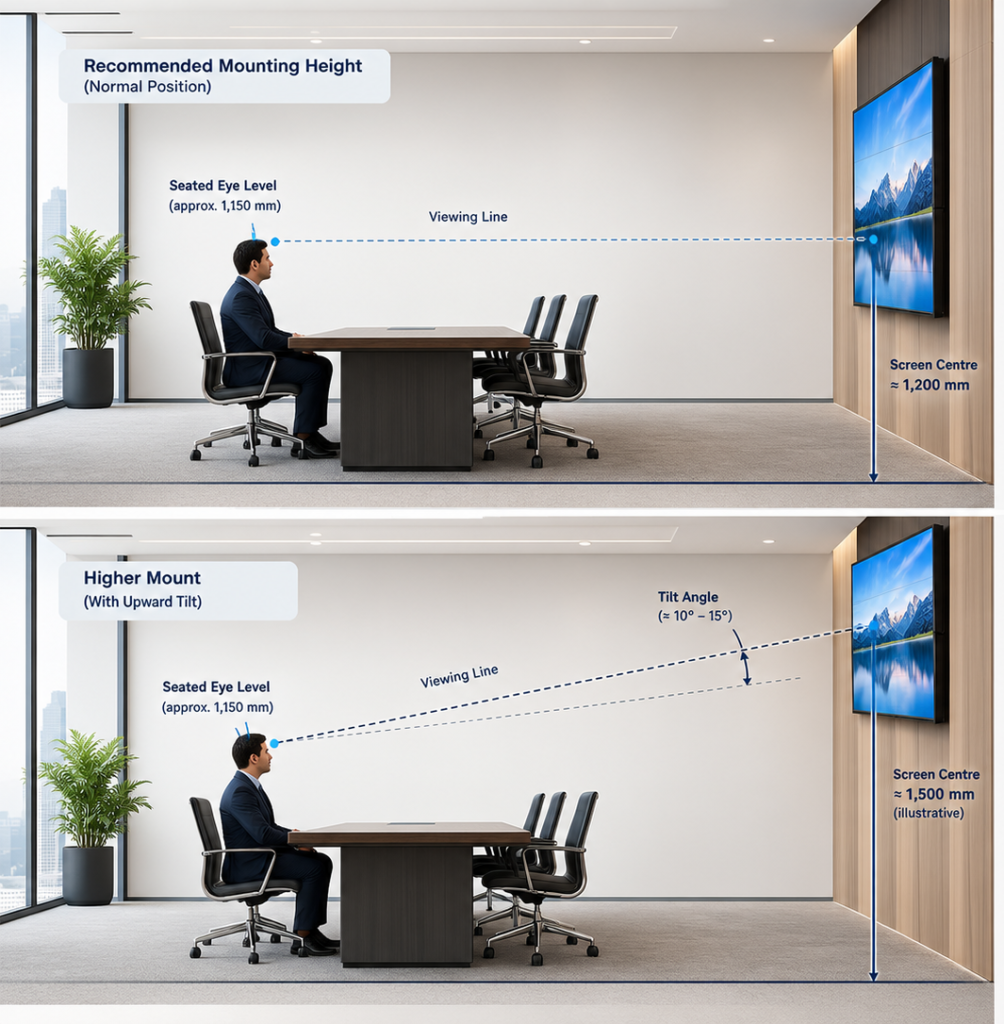
Normal Mounting Position
- Screen centre 1,200 mm from floor base
- Viewing line at seated eye level
- Comfortable, natural viewing experience
Higher Mount
- Screen centre higher than seated eye level
- Requires slight upward tilt
- Still within comfortable viewing range
6. Common Viewing-Distance Mistakes in Boardrooms & Corporate Spaces
- a. Designing around the average seat, not the actual seats:
A boardroom table has a closest chair and a farthest chair — plan for both, not the midpoint.
- b. Mounting for the room, not the meeting:
A screen mounted for a standing town-hall doesn’t serve a seated weekly review well, and vice versa. Ask how the room will actually be used most weeks, not on launch day.
- c. Ignoring the side seats:
Long boardroom tables put people well off-centre. A screen with a narrow viewing angle can look great from the head of the table and noticeably dimmer from seat six.
- d. Planning for slides, then using spreadsheets:
Basic-viewing assumptions break down fast once a room gets used for live data reviews. If there’s any chance of that, plan for analytical viewing from the outset.
- e. Treating viewing distance as a pixel-pitch problem only
A perfectly specified pitch on a screen that’s too small for the back of the room, or mounted too high for the front, still fails the room.
7. How We Approach Viewing Distance Planning
Before we recommend a pixel pitch or a screen size, we ask for the room’s actual seating plan not just its dimensions.
A 6 metre boardroom with everyone clustered at one end plans very differently from the same room with seats spread its full length.
That seating plan, plus what the room will actually be used for week to week, is what turns into a pitch and size recommendation from our indoor LED screen and fine pitch LED ranges: sized for the room you actually have, not the one on the floor plan.
Planning a boardroom or corporate LED video wall? Share your room dimensions and seating layout, and we’ll map out the recommended screen size, pixel pitch and mounting height before you compare quotes.
Get a free site assessment or WhatsApp us your room dimensions for a faster first read.