- Home
- LED Display Guides
- LED Video Wall Pixel Pitch: A Buyer’s Complete Guide
Table of Contents
Most LED video wall enquiries we get start with a budget and a screen size. Very few start with a viewing distance, and that’s backwards.
Pixel pitch, not brand or budget, is the single specification that decides whether your LED display screen looks razor-sharp or visibly pixelated, and it’s the one buyers across India most often get wrong.
In 11+ years of specifying and installing LED video walls for boardrooms, classrooms, showrooms and stages across India, we’ve seen the same mistake repeat: choosing pixel pitch after the budget is fixed, instead of before.
This guide fixes that order. It explains what pixel pitch is, how it drives resolution and cost, and exactly how to match it to your room, whether that’s a six-seat boardroom or a 200-seat auditorium.
What Is Pixel Pitch, Exactly?
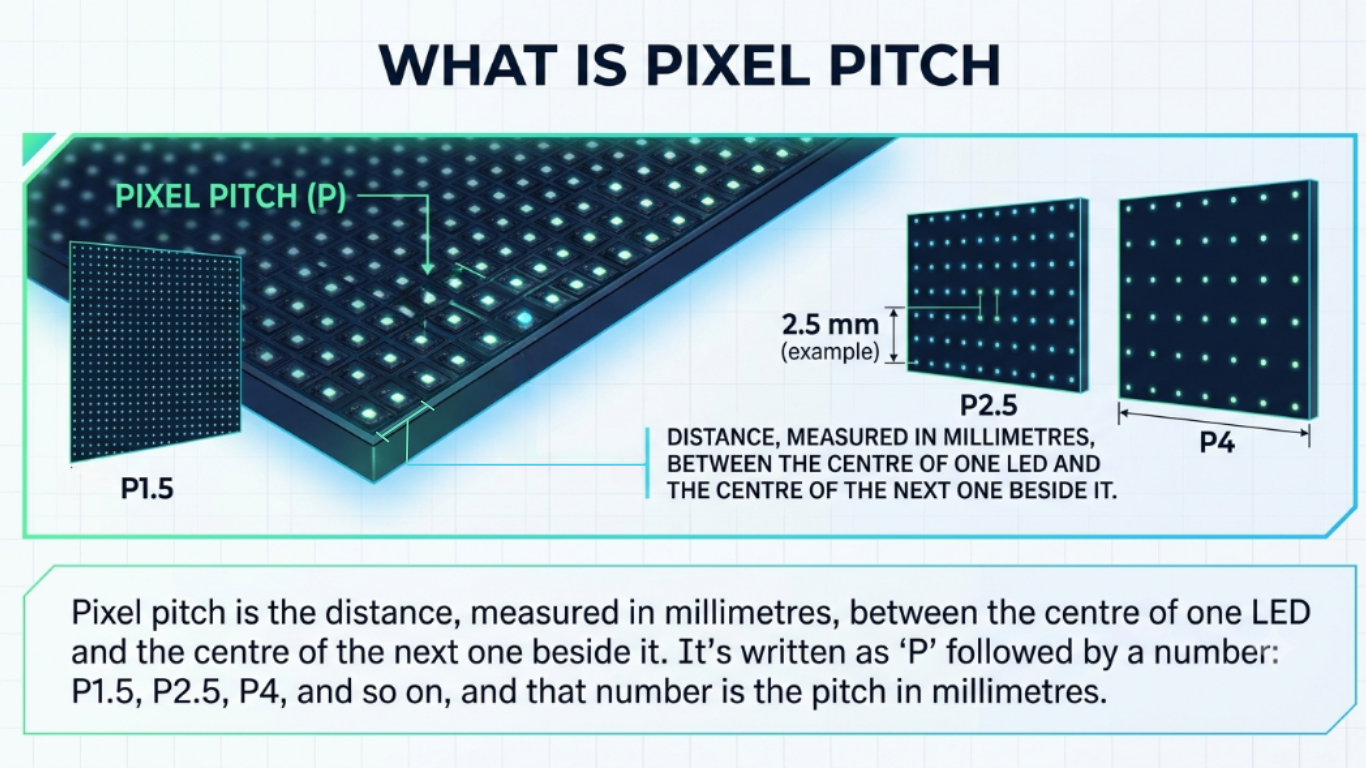
Pixel pitch is the distance (measured in millimetres), between the centre of one LED and the centre of the next one beside it.
It’s written as “P” followed by a number: P1.5, P2.5, P4, and so on, and that number is the pitch in millimetres.
A P4 display has 4 mm between each pixel. A P1.5 display has 1.5 mm between each pixel.
The smaller the number, the tighter the pixels are packed, and the higher the pixel density across the same size of screen.
That single number tells you three things before you’ve even seen the LED display screen switched on:
- how sharp the image will look up close,
- how many pixels the wall can physically hold, and
- roughly how much it’s going to cost per square foot.
How to Calculate LED Video Wall Size
The size of an LED video wall and its resolution are closely connected. To understand what resolution you can achieve, you need to consider both the physical screen size and the pixel pitch.
The basic calculation is simple:
Number of pixels = Screen dimension ÷ Pixel pitch
For example, a 4 m × 2.25 m LED video wall with a P2.5 pixel pitch would have approximately 1,600 × 900 pixels. If the same-sized wall uses P1.25, the pixel count increases to approximately 3,200 × 1,800 pixels.
So, a smaller pixel pitch gives you more pixels within the same screen area and can produce finer image detail.
But smaller pixel pitch isn’t automatically the right choice for every project.
The right pixel pitch depends on where the screen will be installed, how far people will sit from it, and what they will actually see on it.
The Viewing Distance Rule: Matching Pixel Pitch to Your Room
Here’s the principle that matters more than any formula: the human eye can only resolve individual pixels up to a certain distance.
Closer than that, you’ll see the grid, individual dots, or a faint screen-door texture over the image. Beyond it, the eye blends the pixels into a smooth picture regardless of pitch.
That means every pixel pitch has a minimum comfortable viewing distance.
Sit closer than that, and you’re paying for detail nobody in the room will ever resolve, or worse, you under-specified, and the image looks unfinished from the seats that matter.
As a working rule: minimum viewing distance in metres runs roughly equal to the pixel pitch in millimetres, and the genuinely comfortable, no-pixelation-visible distance sits at two to three times that.
Look at the below image, how a P2.5 wall, for example, starts looking clean from about 2.5m and looks effortless from 5-7m onwards.
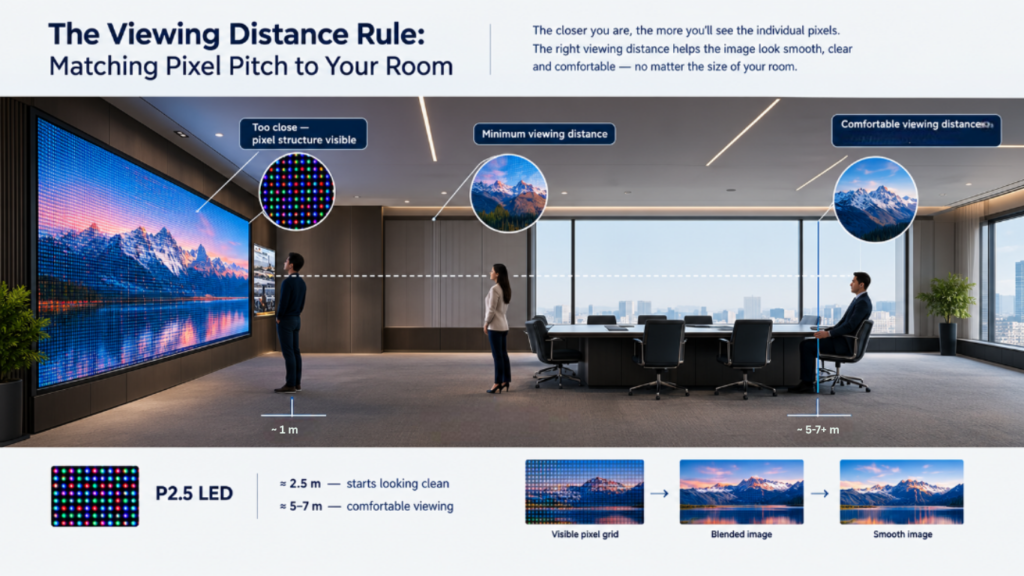
Manufacturers vary slightly on the exact multiplier they quote, but the direction never changes: finer pitch buys you the right to sit closer.
Choosing the Right Pixel Pitch by Application
There is no single pixel pitch that is right for every LED video wall.
A boardroom, retail showroom, auditorium and outdoor advertising screen have completely different viewing conditions. The nearest viewing distance, screen size, content type, ambient lighting and installation environment all matter.
For example:
-
Boardrooms & executive meeting rooms: People may sit close to the screen and view presentations, spreadsheets, dashboards and detailed content. A finer pitch is generally more suitable.
-
Corporate offices, lobbies & reception areas: Viewers are usually further away, with content focused more on branding, video and information. A moderate pixel pitch may be sufficient.
-
Classrooms & lecture halls: The screen needs to remain readable from both the front and back of the room. The appropriate pitch depends heavily on room size and screen dimensions.
-
Outdoor advertising & DOOH: Viewing distances are typically much greater, so pixel density is usually less critical than brightness, visibility and outdoor durability.
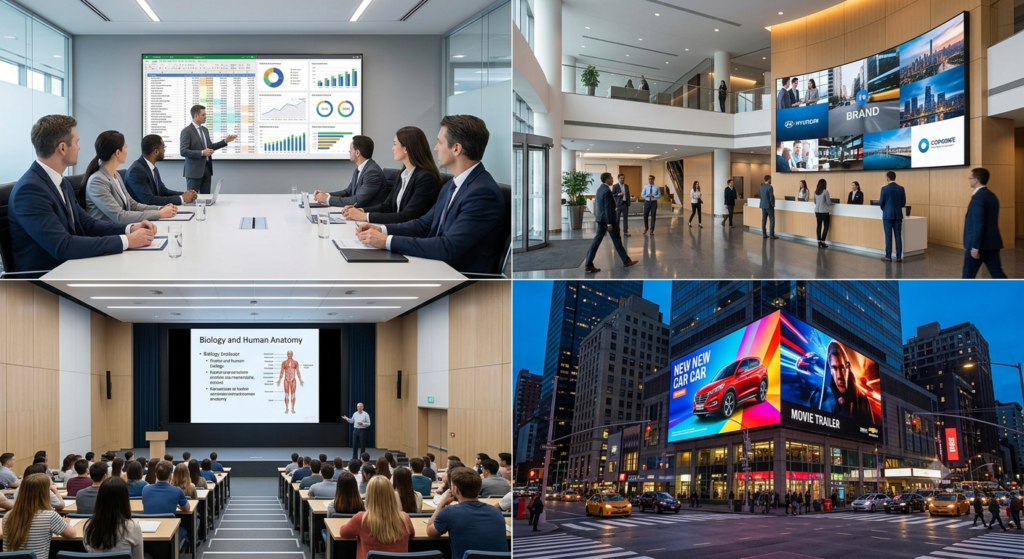
Don’t let the quotation decide your pixel pitch.
Without understanding the actual space, no genuine LED display expert should confidently tell you, “You need P1.8” or “P2.5” based only on a phone call or requirement sheet.
Before accepting a recommendation, ask the LED display solution partner to evaluate:
- Viewing distance: How close will the nearest and farthest viewers be?
- Screen size: What physical dimensions are required for the space?
- Content: Will you show videos, presentations, dashboards, text or detailed graphics?
- Lighting conditions: Is the screen indoors, near windows or exposed to direct sunlight?
- Future requirements: Could the content or usage change later?
- Installation conditions: Is there rear access? Does it need to be flush-mounted or front-serviceable?
A reliable provider should be able to explain why a particular pixel pitch is being recommended, rather than simply quoting the lowest or highest specification.
Common Pixel Pitch Mistakes We See Buyers Make
- Overlooking service and post installation support:
Before finalising the LED display, understand how technicians will access it for maintenance. Ask:
- Is front access required?
- Is rear access available?
- How will individual modules or components be replaced?
- What happens if a problem occurs after installation?
Installation and future service should be considered before the screen is installed, not after.
- Choosing pixel pitch based on budget:
The quotation ends up deciding the spec, instead of the room. Start with the space, not the price.
- Ignoring what content will be displayed:
A screen showing promotional videos has different requirements from one displaying spreadsheets, dashboards, presentations or detailed graphics.
- Comparing quotations only by price:
Two quotations can show the same pixel pitch while offering very different overall solutions. Look beyond the number on the quotation and compare the complete solution – product, design, installation, commissioning, software and post-installation support.
- Looking at only the pixel pitch:
Pixel pitch affects image detail, but it isn’t the only factor that determines how the screen will look. Brightness, contrast, viewing environment, content and installation conditions also matter.
How We Approach Pixel Pitch Selection
We don’t start a pixel pitch conversation with a catalogue.
We start with three questions:
- how far will people actually sit or stand from this screen,
- what will it show most of the time, and
- what’s the room’s ambient light like?
Those three answers narrow the decision down to two or three sensible options before price ever enters the conversation.
That’s the same process behind every LED video wall we’ve installed over 11+ years across India, where our recommendations are based on the actual space, application and viewing conditions, not simply the specifications on a catalogue.
Not sure which pixel pitch your space needs? Send us your room dimensions and intended use, and we’ll recommend the right pitch before you talk to anyone about price.
Get a free pixel pitch consultation by filling the contact form or WhatsApp us a photo of your space for a faster first read.